Home, Sweet Home
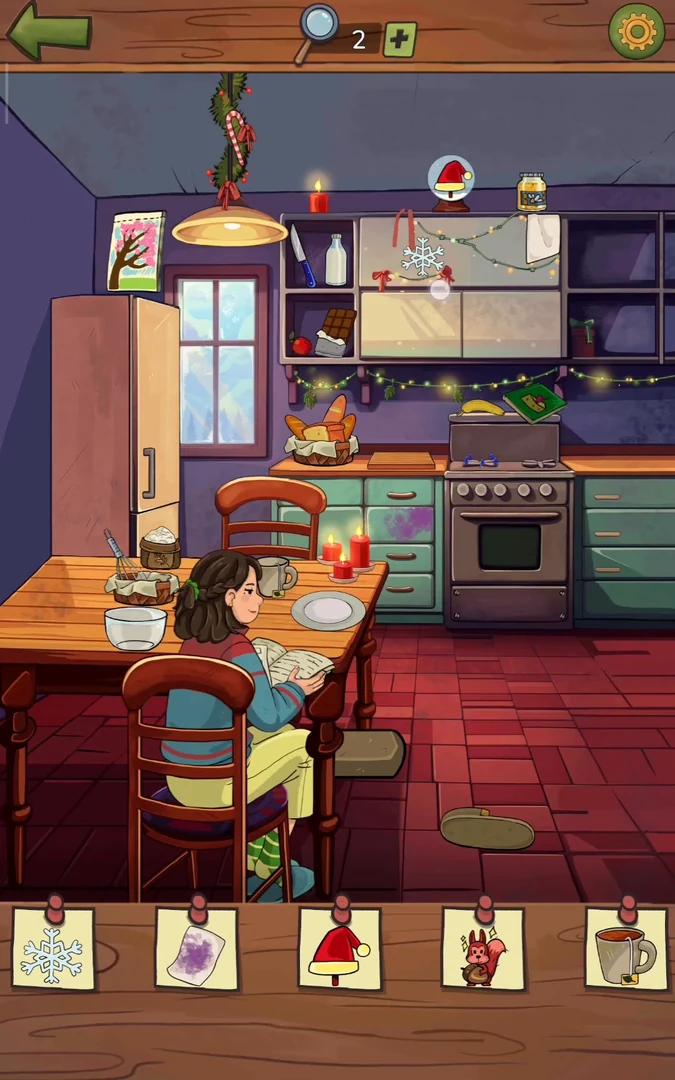
The Christmas Quest is a seasonal event added in a late-2023 holiday update. To open it, go to the chapter-selection screen (the one with the Part cards) and tap the round Christmas-tree button at the bottom left; in the 2023 event it showed a countdown to the end of the event, and in the 2024 event the same button also appeared on the chapter map. The event menu lists four locations: 'Home, Sweet Home', 'Toy Shop', 'The Stranger' and 'The Gift'. Only Home, Sweet Home is open at first; each later one unlocks when the previous one is finished. The first location is the sheriff's kitchen. The checklist has eleven items: snowflake, purple-stained cloth, Santa hat, squirrel, mug, plate of jam toast, Christmas-tree card, reindeer, slipper, oven mitt and cake. Then check the shopping list as the important clue.
- In the Christmas Quest menu, choose Home, Sweet Home (the only open entry). In the kitchen, tap the snowflake decoration on the upper cabinet door.
- Drag the white cloth hanging at the upper right of the cabinets down to the purple stain on the lower cabinet door left of the oven. The cloth wipes the stain and turns purple; tap the purple-stained cloth.
- Tap the snow globe on top of the cabinets. A Santa hat comes out of it; tap the hat.
- Tap the frosted window so the frost clears; a squirrel jumps onto the window. Touch the bread basket below the window to give the squirrel an acorn, then tap the squirrel.
- Tap the sliding upper cabinet door to reveal a kettle. Drag the kettle onto the stove; it heats up and turns red. Drag the hot kettle to the mug on the table to fill it, then tap the mug.
- Drag the bread loaf from the bread basket to the counter. Drag the knife from the open shelf at the top left (beside the milk) to the loaf to cut a slice, and drag the slice to the empty plate on the table. Open the fridge and drag the pink jam jar from its bottom shelf to the plate. Tap the plate of jam toast.
- Tap the picture on the upper-left wall repeatedly. It changes from pink blossom to teal, then yellow, then green with a snowy Christmas tree. Tap it when it shows the Christmas tree.
- Tap or drag the rolled-up rug under the end of the table. It unrolls and shows a reindeer pattern; tap the reindeer.
- Tap the brown oval on the floor below the rug several times until it turns into a slipper, then tap the slipper.
- Tap the oven door to open it; an oven mitt is inside. Tap the mitt.
- Gather the ingredients on the table at the bottom left, where the flour sack, bowl and whisk already are: drag the 3 eggs and the butter from the fridge, the chocolate bar from the shelf and the milk bottle from the top shelf. Tap the bowl to open the baking mini-game and follow the recipe book: 1) the three eggs, 2) the milk, 3) the butter, then whisk, 4) the chocolate, then whisk, 5) the flour, then whisk. Open the oven, drag the batter bowl to the cake tin, wait for it to bake, open the oven again, take the cake out and tap it.
- Important clue: the sheriff's wife greets him ('Good evening, dear! How was your day?'). He says he bought everything and wants to double-check the list. The shopping list shows two bananas, an apple, two candy canes, a lettuce and a jar. Tap each one in the kitchen: the banana on the shelf under the sliding upper cabinet, the banana on top of the box by the kettle, the red apple on the left shelf, the striped candy cane on the lower shelf beside the blue cloth, the candy cane hanging on the holly garland above the ceiling lamp, the lettuce in the open fridge and the honey jar on top of the upper cabinets. Then she asks: 'Great! What about the toy Laura asked Santa for? Have you already wrapped it?' The sheriff: 'Oh no, I completely forgot'. She adds: 'She's been so excited about it, constantly asking if she's been good enough for Santa to bring it.' He promises: 'Don't worry, there's still time' and that he will make sure to get the toy. The menu returns with Home, Sweet Home ticked and Toy Shop unlocked.
Toy Shop
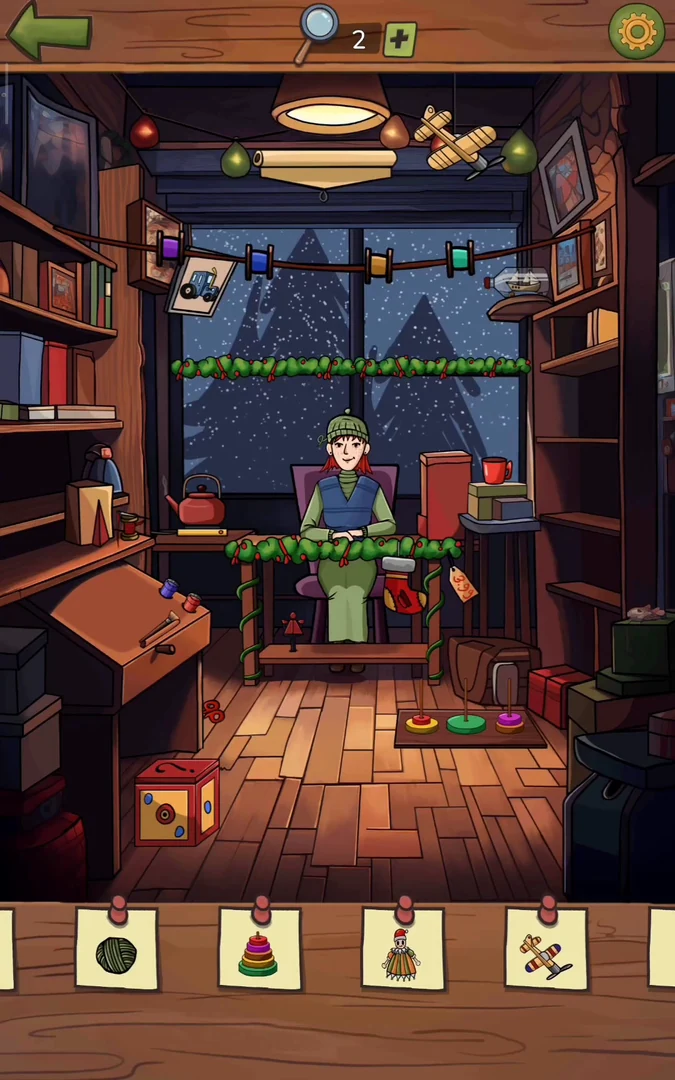
After Home, Sweet Home, Toy Shop unlocks in the Christmas Quest menu. The sheriff visits the toy store, where the shopkeeper Emily sits at her desk. His first thoughts start 'This toy store...' and 'I can't go home empty-handed!'. The checklist has eleven items and scrolls sideways: blue tractor, green yarn ball, ring-stack toy, jester doll, toy airplane, price tag, teal ribbon, stocking, heart, ship in a bottle and antlers. Then find the important clue.
- In the Christmas Quest menu, choose Toy Shop. Tap the picture card with a tractor drawing that hangs on the string of lights at the upper left. The blue tractor pops out of the picture; it is collected.
- Tap the loose thread on the shopkeeper's green knitted hat. The hat unravels into a ball of green yarn; tap the yarn ball.
- Tap the coloured rings scattered on the floor in front of the desk to open the ring-stack puzzle. There are three poles. At the start the left pole has the yellow ring with the red ring on top, the middle pole has the big green ring, and the right pole has the orange ring with the pink ring on top. Stack all five rings on the middle pole from biggest to smallest (green, yellow, orange, pink, red); a bigger ring cannot go on a smaller one. It can be solved in 11 moves: red left to right; yellow left to middle; red right to left; pink right to middle; red left to right; pink middle to left; red right to left; orange right to middle; red left to right; pink left to middle; red right to middle. Then tap the finished ring toy on the floor.
- Tap the loose floorboard in front of the desk. It lifts and reveals a crank handle. Drag the crank to the side of the red-and-yellow jack-in-the-box at the bottom left, then turn it in circles until the jester doll pops out. Tap the jester.
- Tap the unpainted wooden airplane hanging from the ceiling. It flies down onto the slanted desk at the left. Tap it there to open the painting close-up with a brush, a blue paint pot and a red paint pot. Paint the plane like the checklist picture: dip the brush in blue and paint both rounded ends of the big lower wing; then dip it in red and paint every narrow band drawn across both wings and the round hole in the tail fin. Close the view and tap the painted plane.
- Tap the orange price tag hanging at the right end of the shopkeeper's desk.
- Tap the teal spool on the string of lights (right of centre); a long teal ribbon unrolls down to the desk. Drag the scissors from the floor left of the desk up to the ribbon to cut it. The cut piece drops to the floor; tap it.
- Drag the red thread spool with a needle from the left shelf (beside the kettle) to the red stocking hanging on the front of the shopkeeper's desk. Then tap the stocking.
- Drag the red kettle from the left shelf to the red mug on the stack of books right of the desk. The kettle pours, and the steam rising from the mug forms a heart; tap the heart.
- Tap the ship in a bottle on the right-hand shelf at the end of the string of lights.
- Tap the brown bag on the floor right of the desk. It opens and a pair of antlers pokes out; tap the antlers. This completes the checklist.
- Important clue: the rolled-up poster under the ceiling lamp unrolls. It advertises a grey plush toy: 'NEW NEW NEW - FRIEND FOR KIDS'. Tap the poster to start the conversation. The sheriff greets Emily, the shop owner, and wishes her a Merry Christmas. Emily: 'Merry Christmas, Sheriff! What brings you here on Christmas Eve?' 'It must be something important.' The sheriff explains that he forgot to buy Laura's present and that she has set her heart on the plush toy all the kids are raving about. Emily: 'Ah, the Wooloo toy.' 'I'm truly sorry.' The shop has none left. The sheriff: 'Is there really not even one left?' Emily: 'Perhaps there's another toy that might interest her?' The sheriff: 'It has to be Wooloo.' He says he will figure something out, thanks her and wishes her happy holidays. Emily: 'Happy holidays, Sheriff. I hope you find what you're looking for.' The menu returns with Toy Shop ticked and The Stranger unlocked.
The Stranger
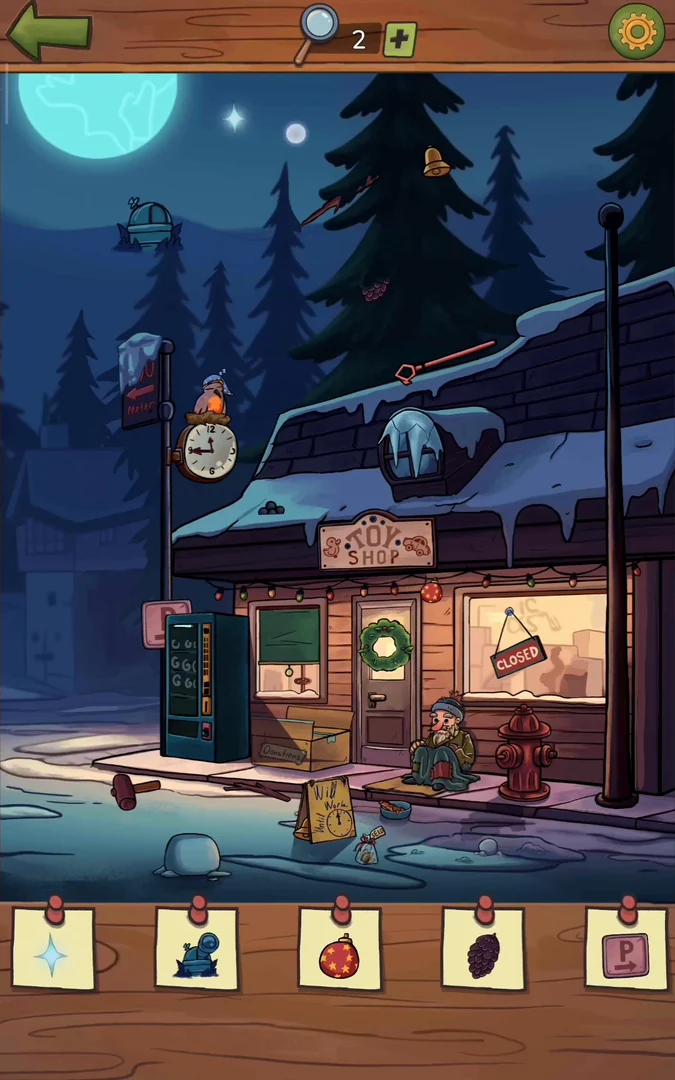
After the Toy Shop, The Stranger unlocks in the Christmas Quest menu. It is night outside the closed toy shop, and a stranger sits on the bench by the door. The sheriff's thoughts start 'I can't believe...' and 'How could...'. The checklist has twelve items and scrolls sideways: blue sparkle, observatory dome, red bauble, pine cone, parking sign, icicle, OPEN sign, wreath, snowman, pink sparkles, TOY SHOP sign and blue teddy bear. Then find the important clue.
- In the Christmas Quest menu, choose The Stranger. Tap the twinkling blue star in the night sky to the left of the big fir tree; it is collected.
- Tap the small blue observatory dome that pokes out of the treetops at the upper left. A telescope slides out of it; it is collected.
- Tap the red bauble hanging on the string of lights to the right of the shop door, above the left corner of the shop window.
- Tap the big fir tree behind the shop roof. A pine cone appears in its branches; tap the pine cone.
- Tap the pink parking sign marked P on the wall to the left of the vending machine.
- Drag the red hydrant wrench lying on the snowy roof (upper right) down onto the top of the red fire hydrant. The wrench turns the hydrant valve. Tap the hydrant: water runs out and freezes into an icicle at its base. Tap the icicle.
- Tap the CLOSED sign hanging in the shop window. It flips over to OPEN; tap the OPEN sign.
- Drag the hammer lying in the snow at the bottom left (left of the vending machine) to the iced-over round window in the roof. The ice breaks and the window opens, showing a red bow. Drag the bow onto the green wreath on the shop door. Then drag the gold bell from the top of the big fir tree onto the wreath. Tap the decorated wreath.
- Build a snowman on the lump of snow at the bottom left. Tap the snowball on the ground (right of the paper bag) so it rolls onto the lump. Drag the snowball beside the hydrant onto it as the head. Drag the twig lying on the sidewalk, then the twig at the top-left corner of the green window left of the door, to the snowman as arms. Drag the coal lumps on the right edge of the vending machine to it for eyes and buttons. Drag the carrot from the bowl in front of the stranger to it as the nose. Tap the green window left of the door to open it and drag the black top hat inside onto the snowman. Tap the finished snowman.
- Tap the clock on the lamp post at the upper left, where a bird in a nightcap sleeps. In the close-up the long hand points to 9 and the short hand to 12. Drag the long hand round to 12 so both hands point straight up at midnight; the bird wakes. Back in the scene, drag the small sack labelled SEED (on the ground beside the paper bag) to the bird. Pink sparkles appear above it; tap them.
- Tap the TOY SHOP sign above the door to open a close-up. The sign has five empty bulb sockets (three along the top, one left of the T and one right of the Y) and faded T, O and Y letters. Drag the five loose bulbs into the sockets and drag the red letter pieces onto the T, O and Y. The bulbs change colour when they light up; this arrangement lit the sign: blue, green and pink along the top, yellow at the left and turquoise at the right. Then tap the lit sign in the scene.
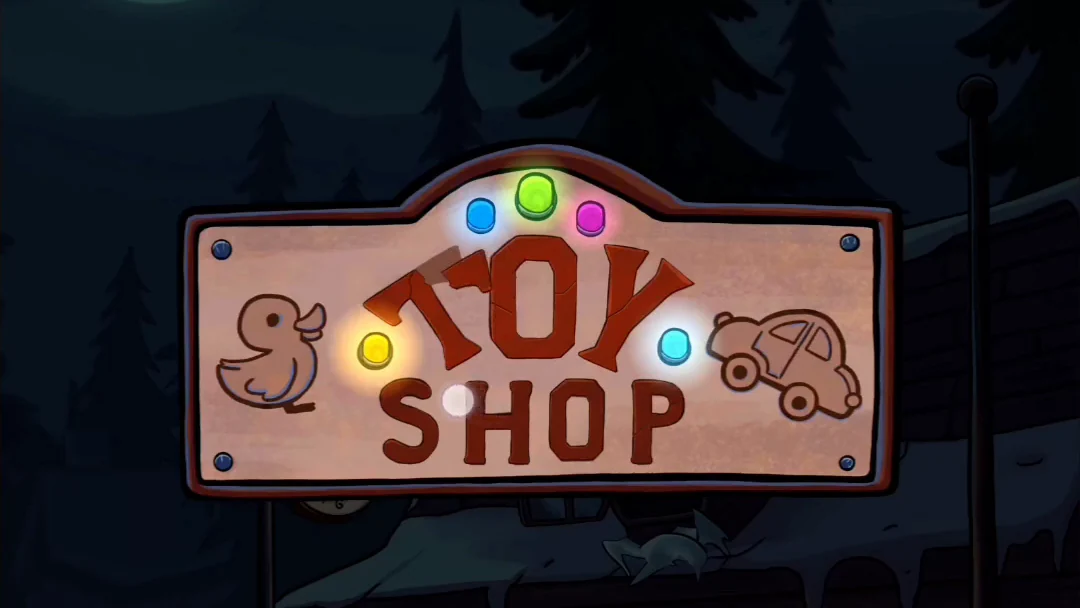
The lit sign: blue, green and pink along the top, yellow on the left, turquoise on the right. - Tap the cardboard box on the sidewalk in front of the window, left of the door. In the close-up, drag aside the toy ball, purple sweater, mittens, scarf and toy train. Tap the blue teddy bear at the bottom of the box.
- Important clue: with all twelve items found, the stranger speaks: 'Good evening, my friend. You seem troubled.' and 'Share your story with me, perhaps I can offer some assistance?' The sheriff explains that he ran out of time to buy a Christmas present for his daughter, then asks, 'You're out here in the cold. Can I get you something to eat or drink?' Tap the vending machine left of the door. Each snack has a code and a price: 371 burrito 23¢, 645 chips 14¢, 876 purple snack 21¢, 776 sandwich 17¢, 302 green bar 9¢, 557 orange can 19¢, 908 green can 11¢, 420 purple can 16¢. Coins lie on the tray: 10¢, 5¢, 2¢ and 1¢. First buy the drink: put in 10¢ and 1¢ (display 11¢), key 9-0-8 and press the green tick. The green can drops. The sheriff says, 'Now, we need to buy food.' Put in 10¢, 5¢ and 2¢ (display 17¢), key 7-7-6 and press the tick. The sandwich drops. The stranger says, 'Thank you, your kindness means a lot.' and 'It's a small thing, but it's from the heart.' The sheriff invites him for Christmas, but the stranger has other commitments. The menu returns with The Stranger ticked and The Gift unlocked.
The Gift
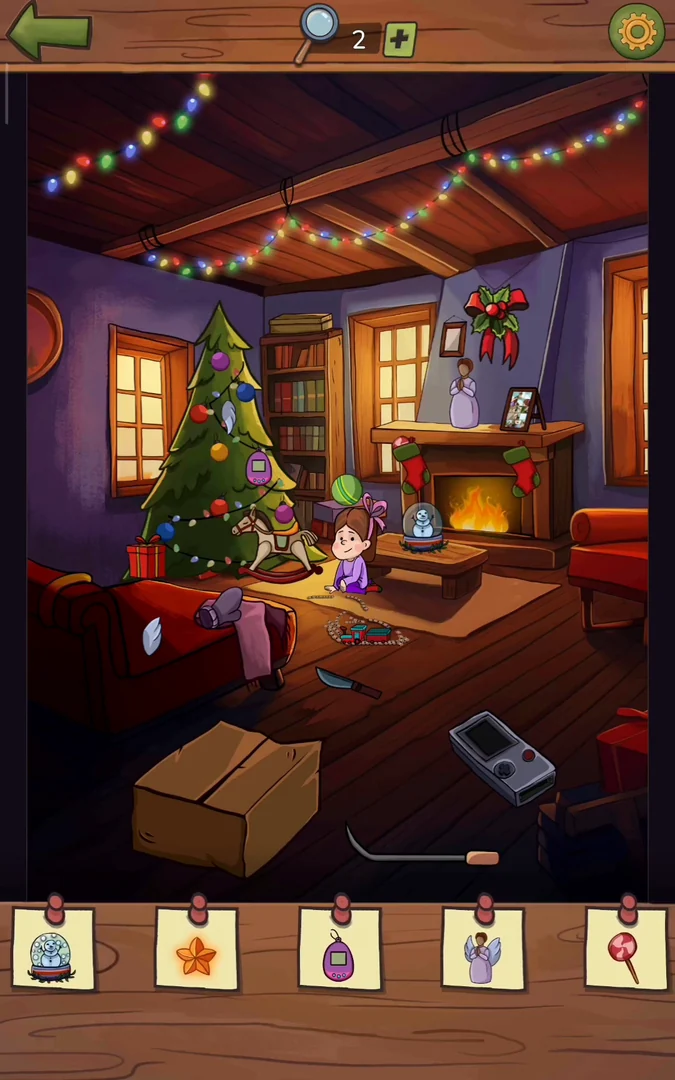
After The Stranger, The Gift unlocks in the Christmas Quest menu. It is Christmas morning in the living room. Laura says, 'It's finally time to open the presents!' and 'I'm pretty sure Santa brought me a Wooloo toy.' The sheriff warns her that Santa might have picked something different. Laura says, 'While Mom bakes cookies, let's hunt for the presents.' The checklist has eleven items and scrolls sideways: snow globe, orange star, purple virtual-pet toy, angel figurine, lollipop, green ball, lilac mittens, photo frame, gift box, white steam puff and handheld console. Then find the important clue.
- In the Christmas Quest menu, choose The Gift. After the opening conversation, tap the snow globe on the low table beside Laura. A 'SHAKE YOUR PHONE' prompt appears. Shake the device until snow swirls in the globe, then tap the globe to collect it.
- Tap the cardboard box at the bottom left. Its flaps open to show an orange star. Drag the star to the top of the Christmas tree; it lights up and is collected.
- Tap the purple virtual-pet toy hanging in the middle of the Christmas tree.
- The angel figurine on the mantel is missing its wings. Drag the white wing hanging on the right side of the tree to the angel, then drag the second wing lying on the red sofa at the left to it. Tap the complete angel.
- Tap the candy peeking out of the left stocking on the mantel. The lollipop rises out of the stocking; tap it.
- Tap the green striped ball on the rocking horse beside Laura.
- Tap the top of the tall bookcase. A lilac mitten appears. Drag it to the matching mitten on the arm of the sofa at the left, then tap the pair.
- Tap the photo frame on the mantel to the right of the fireplace. The close-up shows a photo cut into a grid of three columns and five rows of scrambled tiles. Tap one tile and then another to swap them. Keep swapping until the photo of the sheriff with Laura is complete; the frame then returns to the mantel and is collected.
- Drag the fire poker lying on the floor beside the handheld console into the fireplace. The fire goes out in a puff of smoke and a red sack falls out to the right of the fireplace. Drag the blue-handled knife lying on the floor left of the rug to the sack. The sack opens to show a blue gift box; tap it.
- Tap the toy train on the rug. A tray of seven track pieces appears at the top, with two fixed pieces in the room: a powered station piece (its cable runs to the wall) to the right of Laura and a short curve near the cardboard box at the bottom. Drag the tray pieces into the room to build one closed loop: from the curve by the box, run a long straight up the left side, curve right at mid-height, add an S-curve up past Laura, curve over the top and down the right side into the station, then join the station back to the box curve with an S-curve. The train runs and a white puff of steam rises above it; tap the steam.
- The cardboard box at the bottom left now holds two gold batteries. Drag both batteries onto the handheld console on the floor at the right, then tap the console. The rules read 'Match 3 items of the same color in a row'. Four gift icons along the top (green, blue, red and purple) are the goals. Press the red button to start. Bars of three coloured blocks fall: the left and right sides of the D-pad move a bar, down drops it faster, and the red button switches it between flat and upright. Line up three blocks of the same colour to light that colour's gift. When all four gifts are lit, the game closes; tap the console in the room.
- Important clue: with all eleven items found, a roughly wrapped box appears in front of the tree beside Laura. Laura says, 'Look, I found something! This box is odd, though.' and 'It's like Santa didn't have time to wrap it properly.' The sheriff says, 'I wouldn't get my hopes up about this box having your Wooloo toy.' Laura answers, 'Let's open it and see!' Tap the box; it opens to show a blue Wooloo plush. Laura cries, 'Dad, it's Wooloo!' and the sheriff says, 'What? Really? I can't believe it's actually Wooloo!' and 'It's like a Christmas miracle!' In the closing scene, the stranger, now wearing a Santa hat, sits outside the toy shop holding a snow globe that shows Laura with Wooloo, and a 'Happy Holidays' card ends the Christmas Quest.